What is MCP? Connecting AI to business data
MCP explained simply: how it connects AI applications to tools and business data, when it makes sense and what a secure deployment requires.
Richard Böhmer, MSc
An AI assistant can explain what margin means. Without access to your systems, it cannot tell you what your company’s margin was last month. Uploading another spreadsheet for every question is not a sustainable solution either.
This is where MCP (Model Context Protocol) can help. It is an open protocol that standardises how AI applications connect to external tools and data.
What is MCP in plain language?
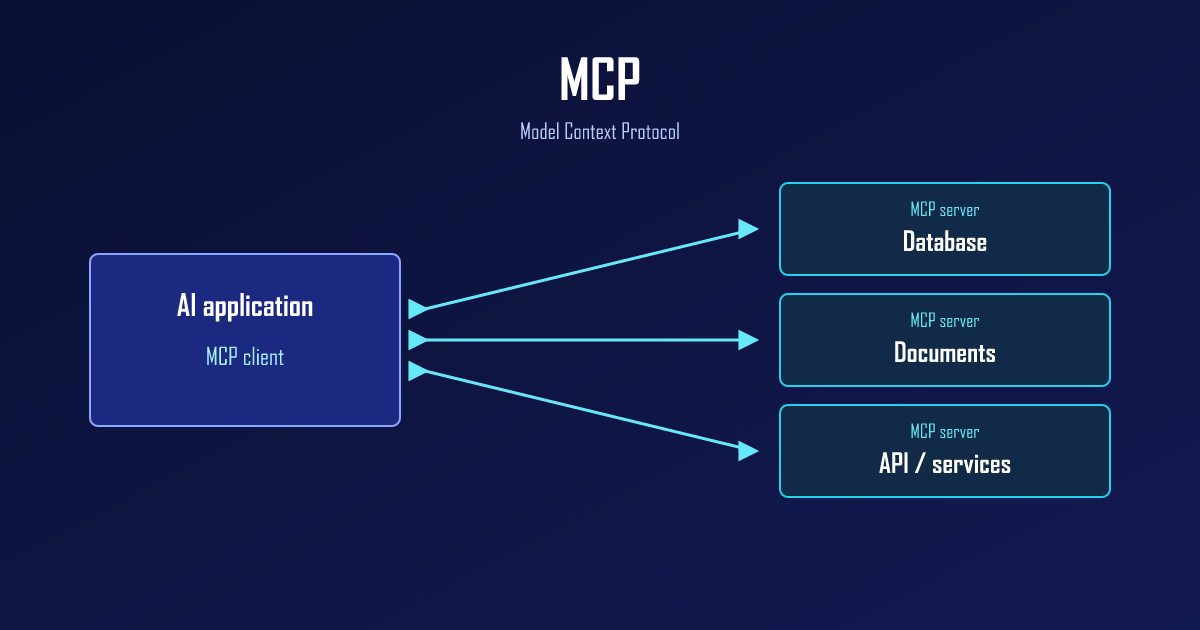
Think of a shared language between an AI application and a business system. The application discovers which tools are available, what inputs they need and how to call them. A server executes the tool and returns the result.
Three parts work together:
- The AI application where the user asks questions, such as Claude, Cursor or VS Code with a compatible AI extension.
- An MCP client inside that application, communicating with the server.
- An MCP server exposing specific tools, resources or prompt templates.
Support for particular capabilities depends on the application, version and configuration. MCP does not mean every AI tool automatically works with every business system without setup.
How AI accesses business data
An MCP server can expose a tool for retrieving revenue, finding a document or checking an order’s status. The AI application does not need to know the technical details of every source system, but it does need to understand the available tool’s description and inputs.
Users do not need to open a separate portal or prepare an export for every question. The important work happens behind the scenes: connecting systems, defining metrics and checking which data each user may access. Available tools and data sources are configured for each deployment.
MCP defines the communication mechanism. The server and connected systems must enforce what is allowed and establish what the results mean.
At RBH Technology, we also use this approach in AskData, our AI assistant for business data, and in custom AI integrations.
Example: comparing revenue
A manager asks: “Compare October revenue with September by branch.”
An illustrative workflow:
- The AI application selects an available revenue tool and supplies the periods and breakdown.
- The server checks identity, permissions and inputs. It restricts the query to data the user is allowed to see.
- The data layer calculates the result using the agreed definition of revenue.
- The AI receives the result and prepares an explanation, with a chart if the application supports it.
The answer should identify the period, source and relevant limitations. If October is not closed or data is missing, it should say so. A comparison does not establish why revenue changed; that requires further data and analysis.
MCP, APIs and RAG are different things
| Term | What it does |
|---|---|
| API | An interface to a particular system, for example to retrieve invoices or orders. |
| MCP | A common way to expose tools and context to AI applications. It may call an API or database behind the scenes. |
| RAG | Retrieves relevant material, such as document passages, and uses it to help generate an answer. |
These approaches can complement each other. An MCP tool might search documents using RAG or retrieve aggregated figures through an API. Read more in An AI chatbot over your documents.
Security: the protocol is not enough
MCP does not by itself guarantee read-only access, accurate answers or GDPR compliance. Those depend on the implementation and how it is operated.
When designing a connection, we address:
- Server-side and source-system permissions. Telling the model not to reveal certain information is not access control.
- Least privilege. For analytical use cases, we design read-only access to the necessary data, rather than unrestricted access to the whole database.
- Data flows. Tool results may reach the AI application and its model provider. You need to know what leaves your environment, where it goes and under which contractual terms.
- Input validation and limits. Allowed operations, result sizes, time limits and protection against expensive queries.
- Untrusted content. Text inside a document or record is not an instruction to change permissions. Prompt injection remains a concern with MCP.
- Auditing and answer verification. Keep enough information to trace a query, protect sensitive log data and test results against known cases.
Connecting an unfamiliar MCP server is therefore not just adding a convenient extension. It means granting access whose scope you need to understand.
When does it make business sense?
MCP is useful when your team already uses AI and repeatedly needs current information from business systems. It is especially relevant when you want to expose the same data capabilities to several compatible AI applications.
For a single recurring monthly report, a Power BI dashboard may be simpler. If people cannot agree on the definition of revenue, MCP will not resolve that either. Start with a trustworthy data foundation.
We recommend starting with one concrete use case: one user group, a narrow data scope and questions whose answers can be checked. Expand only after that works.
Want to connect AI to your data?
We design MCP connections around your systems, permissions and workflows. We start with the question you need answered, not a list of connectors.
Book a free consultation. We will review your data sources and discuss whether MCP is the right next step.
Technical background: the official MCP architecture overview.